Your HDHomeRun deserves a real TV guide.
ChannelUP is a full-featured Electronic Program Guide built for LG webOS TVs and tailored for Australia. Browse channels, view what's on now and next, and switch to live TV — all from your remote.
Everything you need. Nothing you don't.
ChannelUP replaces the basic HDHomeRun web interface with a real TV experience — designed for the big screen and your remote control.
Full EPG Grid
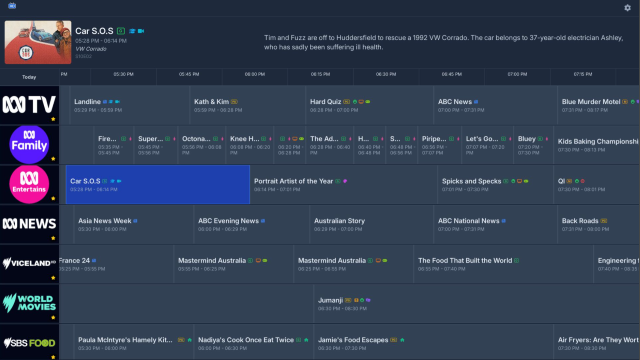
Time-based program guide spanning up to 7 days. See what's on now and what's coming across all your channels at a glance.
Channel Carousel
Card-based channel browser showing current programs with artwork, synopses, and progress indicators. Switch between grid and carousel views instantly.
One-Press Playback
Press Enter on any channel to watch live. Fullscreen playback with a mini carousel overlay for quick channel switching without leaving the stream.
DVB-T Optimised
Built for Australian free-to-air. Enhanced DVB-T support with over-the-air EIT scanning for richer, more current program data than the cloud guide alone.
DVB Subtitles
Full DVB bitmap subtitle rendering — built into the app with no external dependencies. Choose from multiple accessibility fonts including OpenDyslexic.
Multi-Track Audio
Switch between audio tracks and languages during playback. Per-channel preferences are remembered — ChannelUP restores your choices automatically.
Favourites & Filters
Mark channels as favourites, filter by genre, sort by name or number. Your channel list, your way.
Auto-Discovery
ChannelUP finds your HDHomeRun automatically — no IP addresses, no configuration. Just launch the app and go.
Built for TV
Designed from scratch for a 10-foot experience. Full remote control navigation, high-contrast dark UI, smooth animations, and instant response to every button press.
How It Works
ChannelUP connects directly to your HDHomeRun tuner on your home network. No cloud accounts, no subscriptions, no tracking.
HDHomeRun Tuner
Receives free-to-air TV via your antenna. Any DVB-T compatible HDHomeRun model.
Your Home Network
The tuner and your LG TV just need to be on the same network. Wired or Wi-Fi.
LG webOS TV
ChannelUP runs directly on your TV. No extra hardware, no set-top box, no HDMI input needed.
See It In Action
Designed for your living room display
Program Guide
Time-based grid with channel logos, program details, and genre colour coding.

Channel Carousel
Card-style browser with program artwork, progress bars, and quick-tune.
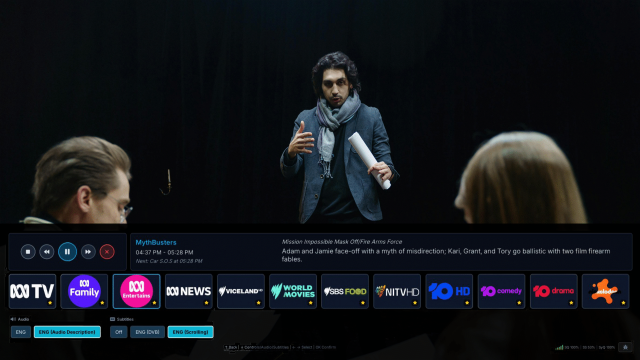
Live Playback
Fullscreen viewing with mini carousel overlay for channel switching.

Streaming Subtitles
Never miss a word with our unique streaming subtitle feature.
Under the Hood
Technical details for the curious
No Backend Required
ChannelUP communicates directly with your HDHomeRun device and the HDHomeRun cloud API. No intermediary servers, no accounts.
Over-the-Air Scanning
The app scans the OTA stream directly from your antenna signal for richer, more current program data to supplement the cloud guide.
Enhanced backend architecture
EPG data processing is processed in the background so the app sticks to the basics.
Subtitles with a twist
A custom subtitle engine extracts DVB subtitles in real-time and overlays them on the video surface with a unique streaming option.
Persistent Preferences
User settings survive app updates via webOS db8 database integration. Audio/subtitle track preferences are remembered per channel.
Built-in Diagnostics
Comprehensive debug overlay with signal quality, tuner status, storage usage, and one-tap remote diagnostic submission for support.
What You Need
LG webOS TV
webOS 22 (2022) or newer. Tested on webOS 22–25.
HDHomeRun Tuner
Any DVB-T compatible HDHomeRun network tuner — CONNECT or FLEX.
Home Network
Both devices on the same local network. Wired Ethernet recommended for best streaming quality.
TV Antenna
Connected to your HDHomeRun for free-to-air reception. Indoor or outdoor — whatever gets you signal.
Get ChannelUP
Coming soon to the LG Content Store
ChannelUP is currently in final testing and will be available on the LG Content Store for webOS 22+ TVs. Check back soon or follow us for launch announcements.